
Solflare: Solana Crypto Wallet2.30.2 - Google Play
You'll be able to see results in few seconds.
Publisher Description



Securely manage meme coins, stake crypto and explore DeFi on Solana blockchain
- Solflare is the most powerful self-custodial crypto wallet on Solana, managing $15B+ in crypto assets and trusted by 4M+ active users.
- Your all-in-one wallet app to buy, store, stake, swap crypto, and manage tokens and NFTs on Solana.
- Securely explore, trade, and manage over 3M+ tokens and meme coins. You control your crypto.
- Beginners and pros can look to build wealth through DeFi, staking, and trading crypto on Solana.
Solflare is your go-to wallet for crypto, DeFi, and Web3. Install Solflare today and claim your place in the Stronghold of the Free!
• Self-custody wallet
Take control of your crypto. Solflare provides a secure self-custody wallet with advanced protection and the freedom to explore Solana on your terms. For even stronger protection, pair your Solflare wallet with a hardware wallet such as Solflare Shield, Ledger, or Keystone.
• Buy crypto at the best rates
Buy coins directly through the Solflare app using debit and credit cards, bank transfers, Apple Pay, Google Pay, and 130+ other options. Purchase Solana directly in the app and quickly convert traditional currencies like USD or EUR to crypto or tokens with just a few taps.
• Send and receive
Quickly send crypto to any Solana address or scan a QR code for instant token transfers. Share your QR code/wallet address to receive funds. Also, send any token and pay gas fees with stablecoins. You can also use Private Send to hide the sending wallet from the recipient.
• Stake SOL
Make your crypto work for you. Stake to earn passive income from your SOL while increasing Solana's stability. You can unstake at any time to access your tokens.
• Swap and trade
Quickly identify the most promising meme coins from 3M+ Solana coins and trade them. As soon as new tokens are created, swap them at the best rates.
• Manage your NFTs
Store, view, and manage your Solana NFTs.
• Trends, tools, and market visibility
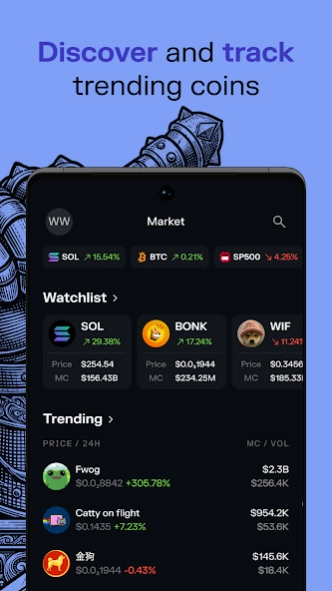
Stay on top of the Web3 and DeFi world with custom watchlists, real-time data, and trends. Track performance with Profit and Loss, review token balance history, and utilize Risk Overview when assessing swaps. Plus, utilize candlestick token charts and buy/sell indicators.
• Track everything in your portfolio
See your coins, NFTs, staking activity, and DeFi positions in one place. Personalize your view and monitor performance from a single screen.
• Limit Orders: fit and forget
Trigger crypto swaps and staking trades in advance.
• Connect to your favorite Solana Web3 dApps
Access Solana Web3 dApps directly from the wallet, including Jupiter, Raydium, Pump.fun, DEX Screener, and Magic Eden.
• Get hardware wallet support with Solflare Shield
Manage your tokens, NFTs, and crypto assets while keeping your holdings offline and extra safe with Solflare’s affordable Solflare Shield cold storage.
• Around-the-clock human support
Need help? Our support team is available around the clock through live chat to help with your wallet, crypto, staking, NFTs, tokens, and swaps.
About Solflare: Solana Crypto Wallet
The company that develops Solflare: Solana Crypto Wallet is Solrise Research Ltd. The latest version released by its developer is 2.30.2.
To install Solflare: Solana Crypto Wallet on your Android device, just click the green Continue To App button above to start the installation process. The app is listed on our website since 2026-10-13 and was downloaded 0 times. We have already checked if the download link is safe, however for your own protection we recommend that you scan the downloaded app with your antivirus. Your antivirus may detect the Solflare: Solana Crypto Wallet as malware as malware if the download link to com.solflare.mobile is broken.
How to install Solflare: Solana Crypto Wallet on your Android device:
- Click on the Continue To App button on our website. This will redirect you to Google Play.
- Once the Solflare: Solana Crypto Wallet is shown in the Google Play listing of your Android device, you can start its download and installation. Tap on the Install button located below the search bar and to the right of the app icon.
- A pop-up window with the permissions required by Solflare: Solana Crypto Wallet will be shown. Click on Accept to continue the process.
- Solflare: Solana Crypto Wallet will be downloaded onto your device, displaying a progress. Once the download completes, the installation will start and you'll get a notification after the installation is finished.
Program Details
System requirements
Download information
Pricing
Version History
version 2.30.2
posted on 2026-10-13
Build Information
----------------------------------------
RC: 1
Environment: PROD
Branch: hotfix/solflare-v2.30.2
Links
----------------------------------------
Workflow run:
https://github.com/solflare-wallet/solflare-flutter-wallet/actions/runs/38274270092
ClickUp ticket: #12439gnry50
https://app.clickup.com/t/12439gnry50
Changes
----------------------------------------
Last commit: fix: Cards v2 shutdown flag test variant by default #12439gnry50
version 2.30.0
posted on 2026-10-07
Bug fixes and performance improvements.
version 2.6.0
posted on 2025-10-27
New
• Browser now supports multiple tabs for smoother multitasking across different sites.
Bug fixes
• KYC for Solflare debit card can now be retried if the initial submission is declined.
• Fixed occasional issues with display of trending tokens and token filtering in Market.
version 2.3.1
posted on 2025-08-15
version 2.1.2
posted on 2025-07-11
Tweaks & Fixes: We’ve fixed some bugs for an even smoother Solflare experience.
version 2.0.5
posted on 2025-04-23
Your favourite Solana wallet - now with a brand new look.
- New UI – Sleek redesign, intuitive navigation, and smoother experience.
- 3M+ Tokens – Trade instantly, explore top Solana coins, and swap at the best rates.
- Performance – Faster loads, higher success rates, and cheaper transfers.
- Customization – Personalize your portfolio with exclusive backgrounds from prominent Solana artists
version 1.49.1
posted on 2025-01-22
What's New?
This release is packed with new features, UX/UI improvements, and bug fixes to make managing your Solflare wallet smoother than ever.
New Features & Improvements
- Effortless Ledger Setup: Seamlessly connect and manage your Nano, Stax and Flex Ledger hardware wallets.
- Frozen Token Alerts: Get notified if scammers freeze your token account.
- Tap to Scroll to Top: Quickly scroll to the top by tapping any bottom navigation item.
version 1.48.3
posted on 2024-12-20
- Ledger Stax & Flex Support: Connect your Solflare wallet to Ledger Stax and Flex via Bluetooth for top-tier security and convenience.
- Optimized UX: Sign and send transactions safer and faster.
- Upgraded Blockchain Explorer: We've switched the default blockchain browser from Solana.fm to Solscan
- Sign in with Solana: Easily connect to dApps that support the new standard - no sign message required.
- Bug Fixes
version 1.47.3
posted on 2024-10-01
New: Market Page
Discover trends and explore 200,000+ Solana tokens in the Solflare app.
Find new tokens more easily: Explore a huge range of tokens with real-time market data.
Spot trends: Stay informed about market trends and most popular tokens.
New: Portfolio Widgets
All your Solana assets are now under one customizable home screen.
Check the total value of all assets
Display tokens, NFTs, staked SOL, and activity
Customize portfolio widgets
version 1.46.3
posted on 2024-07-31
Tweaks & Fixes: We’ve fixed some bugs and performance enhancements for an even smoother Solflare experience
Disclaimer
Official Google Play Link
We do not host Solflare: Solana Crypto Wallet on our servers. We did not scan it for viruses, adware, spyware or other type of malware. This app is hosted by Google and passed their terms and conditions to be listed there. We recommend caution when installing it.
The Google Play link for Solflare: Solana Crypto Wallet is provided to you by apps112.com without any warranties, representations or guarantees of any kind, so access it at your own risk.
If you have questions regarding this particular app contact the publisher directly. For questions about the functionalities of apps112.com contact us.
